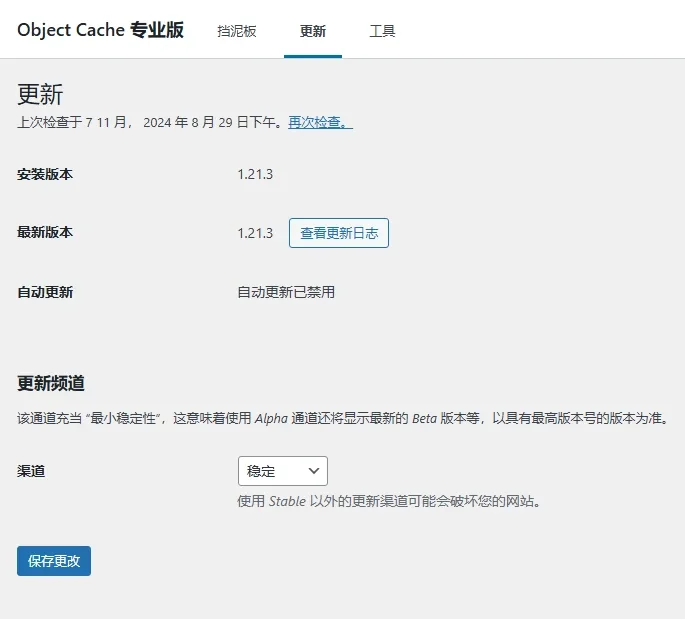
Loading... <h2>Redis Cache Pro 1.21.3</h2> Redis Cache是WordPress站点中有名的对象缓存插件,一般我们开启站点的对象缓存后,然后再到WordPress后台进行Redis Cache插件安装。简单易用,目前在WordPress站点中安装使用的量非常大,而Redis Cache插件又分为免费版及Pro收费版,本次搬主题分享的是Redis Cache Pro 1.21.3专业版插件下载,免费分享给大家。本次更新主要有修复了设置DISALLOW_FILE_MODS时无法访问更改日志的问题及其他问题的修复及改进优化。 <figure class="wp-block-table"> <table> <thead> <tr> <th>资源说明</th> <th>参数</th> </tr> </thead> <tbody> <tr> <td>主题/插件名称</td> <td>Redis Cache Pro</td> </tr> <tr> <td>版本</td> <td>1.21.3</td> </tr> <tr> <td>汉化程度</td> <td>0%</td> </tr> <tr> <td>文件大小</td> <td>408KB</td> </tr> <tr> <td>主题/插件官方原版演示</td> <td><a href="http://robin-image-optimizer.webcraftic.com/" target="_blank" rel="noreferrer noopener">点击这里</a></td> </tr> <tr> <td>WordPress运行环境</td> <td>6.6.2</td> </tr> <tr> <td>PHP版本</td> <td>7.4.3</td> </tr> <tr> <td>数据库MySQL版本</td> <td>5.7</td> </tr> <tr> <td>已专业破解或GPL授权</td> <td>GPL授权</td> </tr> <tr> <td>下载链接</td> <td>文章底部下载按钮</td> </tr> </tbody> </table> </figure> Redis Cache插件又分为免费版及Pro收费版,本次分享的是Redis Cache Pro 1.21.3专业版. <strong><mark class="has-inline-color has-vivid-red-color">注意:功能已激活,但是只是不能在线更新,不影响正常使用。</mark></strong>因为默认没有语言包无法汉化,因此版本就是英文版,但是无任何设置界面,简单易操作也就没太大影响。 <h2>如何安Redis Cache Pro装插件并使用?</h2> 1、在站点根目录下的文件wp-config.php里加入如下代码 <pre class="corepress-code-pre"><code>define('WP_REDIS_CONFIG', [ 'host' => '127.0.0.1', 'port' => 6379, 'database' => 0, // change for each site 'maxttl' => 3600 * 24 * 7, // 7 days 'timeout' => 1.0, 'read_timeout' => 1.0, 'split_alloptions' => true, 'debug' => false, 'token' => 'ndHoi8hn6wZmLUb8OnalsjEd8v8doxMR01vXYIJ6cn7EZjVZ3UulNJuqANaJ', ]); define('WP_REDIS_DISABLED', false);</code></pre> 2、从/wp-content/plugins/redis-cache-pro/stubs/复制文件object-cache.php到/wp-content/。 进入WordPress仪表板,刷新页面查看 <img class="aligncenter size-full wp-image-9939" src="https://www.xnwmw.cn/usr/uploads/2024/11/qvmz3.webp" width="685" height="619" alt="Redis Cache Pro 1.21.3专业版|高级对象缓存优化加速WordPress插件-1" title="Redis Cache Pro 1.21.3专业版|高级对象缓存优化加速WordPress插件-1" style=""> <h2>下载地址</h2> 下载:<span class="external-link"><a class="no-external-link" href="https://wwzi.lanzouj.com/i8YAW2eidz3g" target="_blank"><i data-feather="external-link"></i><span id="f_nowid">https://wwzi.lanzouj.com/i8YAW2eidz3g</span></a></span> 密码: <div class="hideContent">此处内容需要评论回复后(审核通过)方可阅读。</div> 最后修改:2025 年 03 月 04 日 © 允许规范转载 打赏 赞赏作者 赞 如果觉得我的文章对你有用,请随意赞赏
3 条评论
[f=baoquan]
有新版本了
是的